What a shared workflow may need
A workflow file stores connected steps and settings. It does not include every file or extra node used by its creator. If a shared workflow will not run, check for these requirements first:- Input files: Images, video, or audio the workflow expects you to provide.
- Local models: Model files that must be downloaded and selected.
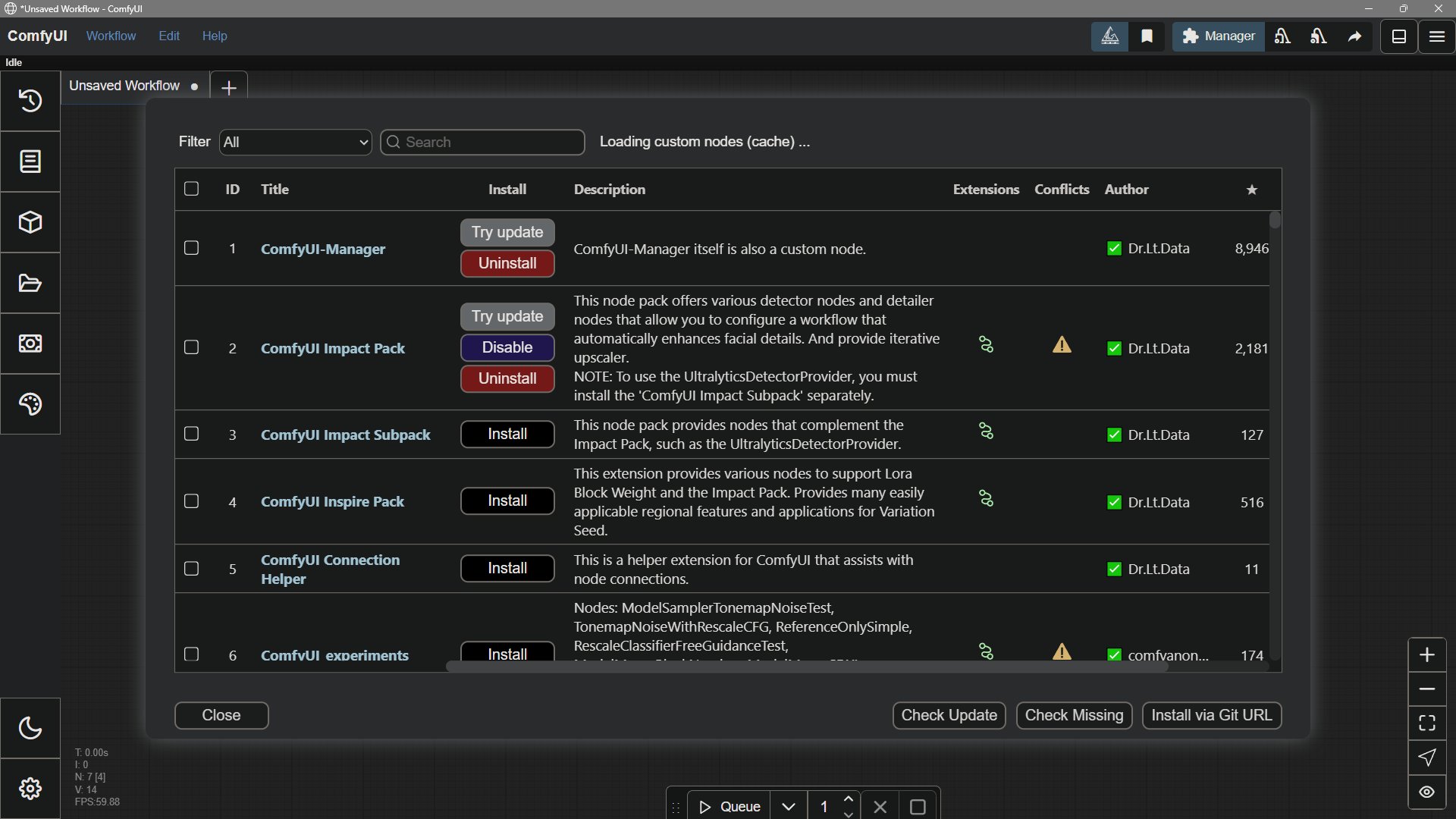
- Custom nodes: Extra node packages that are not installed in your ComfyUI.
- Account and credits: Requirements for hosted Partner Nodes or Comfy Cloud nodes.
Assets
An AI model is an example of an asset. In media production, an asset is some media file that supplies input data. For example, a video editing program operates on movie files stored on disk. The editing program’s project file holds links to these movie file assets, allowing non-destructive editing that doesn’t alter the original movie files. ComfyUI works the same way. A workflow can only run if all of the required assets are found and loaded. Generative AI models, images, movies, and sounds are some examples of assets that a workflow might depend upon. These are therefore known as dependent assets or asset dependencies.Custom Nodes
Custom nodes are an important component of ComfyUI that extend its functionality. They are created by the community and can be installed to add new capabilities to your workflows.Python Dependencies
ComfyUI is a Python-based project. We build a standalone Python environment to run ComfyUI, and all related dependencies are installed in this isolated Python environment.ComfyUI Dependencies
You can view ComfyUI’s current dependencies in the requirements.txt file:comfyui-frontend-package dependency version after the corresponding version stabilizes. If you need to switch to a different frontend version, you can check the version information here.
Custom Node Dependencies
Thanks to the efforts of many authors in the ComfyUI community, we can extend ComfyUI’s functionality by using different custom nodes, enabling impressive creativity. Typically, each custom node has its own dependencies and a separaterequirements.txt file.
If you use ComfyUI Manager to install custom nodes, ComfyUI Manager will usually automatically install the corresponding dependencies.
There are also cases where you need to install dependencies manually. Currently, all custom nodes are installed in the ComfyUI/custom_nodes directory.
You need to navigate to the corresponding plugin directory in your ComfyUI Python environment and run pip install -r requirements.txt to install the dependencies.
If you’re using the Windows Portable version, you can use the following command in the ComfyUI_windows_portable directory:
Dependency Conflicts
Dependency conflicts are a common issue when using ComfyUI. You might find that after installing or updating a custom node, previously installed custom nodes can no longer be found in ComfyUI’s node library, or error pop-ups appear. One possible reason is dependency conflicts. There can be many reasons for dependency conflicts, such as:- Custom node version locking
open_clip_torch==2.26.1), while other plugins may require a higher version (e.g., open_clip_torch>=2.29.0), making it impossible to satisfy both version requirements simultaneously.
Solution: You can try changing the fixed version dependency to a range constraint, such as open_clip_torch>=2.26.1, and then reinstall the dependencies to resolve these issues.
- Environment pollution
PyTorch but require different CUDA versions, and the later installed plugin will break the existing environment.
Solutions:
- You can try manually installing specific versions of dependencies in the Python virtual environment to resolve such issues.
- Or create different Python virtual environments for different plugins to resolve these issues.
- Try installing plugins one by one, restarting ComfyUI after each installation to observe if dependency conflicts occur.
- Custom node dependency versions incompatible with ComfyUI dependency versions
Models
Models are a significant asset dependency for ComfyUI. Various custom nodes and workflows are built around specific models, such as the Stable Diffusion series, Flux series, Ltxv, and others. These models are an essential foundation for creation with ComfyUI, so we need to ensure that the models we use are properly available. Typically, our models are saved in the corresponding directory underComfyUI/models/. Of course, you can also create an extra_model_paths.yaml by modifying the template to make additional model paths recognized by ComfyUI.
This allows multiple ComfyUI instances to share the same model library, reducing disk usage.
Software
An advanced application like ComfyUI also has software dependencies. These are libraries of programming code and data that are required for the application to run. Custom nodes are examples of software dependencies. On an even more fundamental level, the Python programming environment is the ultimate dependency for ComfyUI. The correct version of Python is required to run a particular version of ComfyUI. Updates to Python, ComfyUI, and custom nodes can all be handled from the ComfyUI Manager window.